 USA

How Smart Thermostats Learn Your Schedule (And Why It Works)
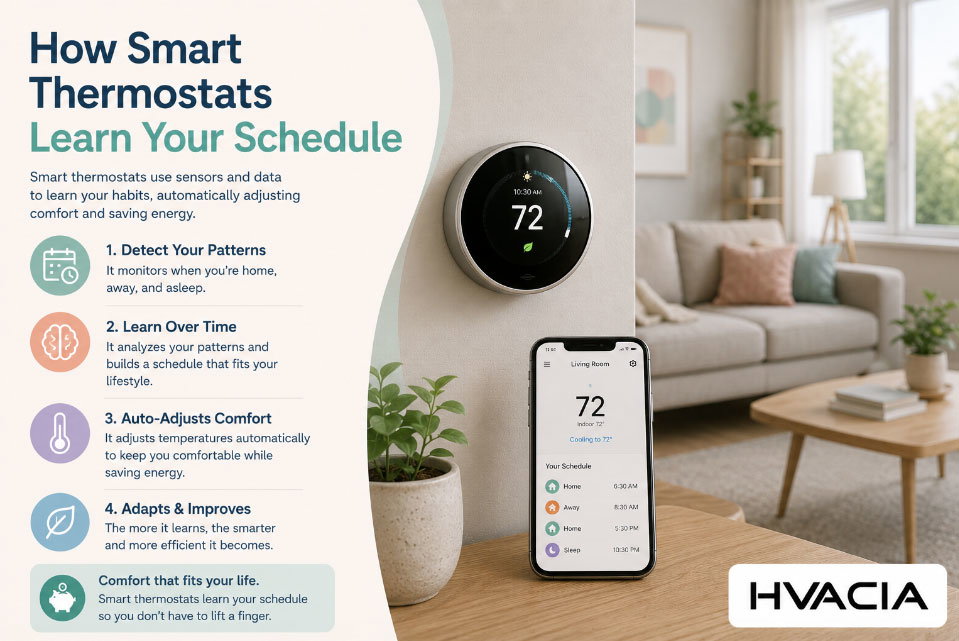
There's a specific moment that hooks almost every new smart thermostat owner. It's usually around day four or five, when the house starts warming up ten minutes before the alarm goes off, or the living room cools down right as someone walks in from work. No one told the thermostat to do that. It just... did.
That moment feels like magic, but it isn't. It's the result of a fairly ordinary combination of sensors, timestamps, and pattern-matching math running quietly on a device most people never think about until the temperature feels wrong. Understanding how smart thermostats learn schedule patterns takes away none of the charm — if anything, it makes the whole system easier to trust, troubleshoot, and get more out of.
This piece walks through exactly what's happening behind the glass screen: the data these devices collect, the timeline of how learning unfolds week by week, the algorithms doing the heavy lifting, where the major brands differ, and what you can do to help your thermostat "get it" faster.
What "Learning" Really Means for a Thermostat
Calling it "learning" is a little generous, at least compared to how the word gets used in artificial intelligence research. A smart thermostat isn't reasoning about your life or developing an understanding of who you are. What it's actually doing is closer to statistics than cognition: it's logging events, tagging them with a time and a context, and looking for repetition.
Every time someone nudges the temperature dial or taps the app, the thermostat records three things: what the new setting was, when the change happened, and what conditions surrounded it (was the house occupied, what was the outdoor temperature, was it a weekday). Do that enough times, on a consistent enough cadence, and the device starts predicting the next adjustment before a person makes it.
That's the entire trick. There's no hidden understanding of "you like it cooler after a workout" — there's a cluster of data points that says "temperature drops to 68°F most weekdays around 6:45 a.m.," and the system starts executing that drop automatically. The sophistication is in how quickly and accurately it can find that cluster, not in any deeper comprehension of daily life.
The Raw Ingredients: What Data a Thermostat Actually Collects
Before any pattern can be learned, there has to be something to measure. Modern smart thermostats pull from several data streams simultaneously, and the mix of these streams is what separates a genuinely responsive device from a device that just runs a fixed program.
Manual Temperature Adjustments
This is the founding dataset for almost every learning thermostat on the market. Every physical turn of the dial or in-app change is treated as a vote: "at this time, in this context, this is the temperature I want." The U.S. Department of Energy's energysaver guidance on thermostats has long pointed out that manually resetting a thermostat for sleeping or leaving hours is one of the simplest ways to cut a heating and cooling bill — and that manual behavior is precisely what a learning thermostat is built to absorb and automate.
Google's own support documentation confirms this is the primary training signal for its devices: according to Google's Nest Help Center, a Nest thermostat begins building a schedule from the very first day it's used, remembering each chosen temperature and folding it into a growing model of the household's routine.
Motion and Occupancy Sensors
Adjustments alone can't tell a thermostat whether anyone is actually home. That's where built-in or add-on occupancy sensors come in. Small motion detectors, sometimes paired with remote sensors placed in bedrooms or living rooms, tell the system whether a space is currently in use. Ecobee leans heavily on this approach — its Smart Thermostat lineup uses built-in occupancy detection alongside optional remote SmartSensors so the schedule reflects which rooms are actually lived in, not just which times of day someone historically touched the dial.
Geofencing and Phone Location
Many systems now cross-reference a paired smartphone's location against the home's coordinates. When the phone drifts outside a set radius, the thermostat treats the house as empty and shifts to an energy-saving setback temperature; when the phone starts heading back, it can begin warming or cooling the home in advance. The ENERGY STAR overview of smart thermostats describes this geofencing behavior as one of the defining features that separates connected thermostats from older programmable models — the ability to anticipate arrival rather than simply react to it.
Outdoor Weather and Recovery Time
A thermostat also has to account for physics: a 20°F morning takes longer to heat a home to 70°F than a 45°F morning does. Learning systems log how long a heating or cooling cycle takes to reach a target temperature under different outdoor conditions, then use that recovery-time data to decide when to actually kick the system on so the house is ready at the moment someone wants it — not the moment the schedule technically starts.
Humidity, Air Quality, and Secondary Sensors
Higher-end models fold in humidity readings, since a home at 70°F and 60% humidity feels different from one at 70°F and 30% humidity. This doesn't change the schedule's timing so much as it fine-tunes the target temperature associated with each time block, keeping comfort consistent even as the seasons shift.
How Smart Thermostats Learn Your Schedule, Week by Week
Because this question comes up constantly — how long does this actually take? — it helps to walk through a realistic timeline rather than a marketing summary.
Days 1–3: The thermostat has no schedule yet. It holds whatever temperature is manually set until someone changes it. Every change is logged with a timestamp and context, but there isn't enough data yet to predict anything.
Days 4–7: Rough patterns start to emerge, particularly around obvious anchors like bedtime and wake-up time, since those tend to be the most consistent moments in a household's day. Vendor documentation for Nest devices notes this first week is when the core schedule for a given mode — heat, cool, or heat-cool — starts to take shape, based on repeated manual behavior.
Weeks 2–3: The schedule becomes more confident and starts extending into less obvious transition points: the mid-morning quiet period after everyone leaves for work or school, the early-evening return, weekend patterns that differ from weekdays. This is usually when the "it already knows" feeling kicks in.
Week 4 and beyond: The system settles into a stable baseline schedule but keeps listening for exceptions. A one-off override (say, a sick day at home) typically won't rewrite the whole pattern — most systems are tuned to distinguish a repeated pattern from a single anomaly, which is why turning the temperature up once on a random Tuesday doesn't undo weeks of learning.
Ongoing: The learning never fully switches off. Seasonal changes, new occupants, a change in work schedule, or a new baby's nap times will all gradually shift the pattern again, just more slowly than the initial learning period, since the system now has an established baseline to weigh new data against.
A Day in the Life of a Learning Thermostat
It helps to see the abstract version made concrete. Take a household where someone wakes at 6:30 a.m., leaves for work by 8:00, works from an office until 5:30 p.m., and settles in for the night around 10:30.
On day one, none of that means anything to the thermostat. It simply holds whatever temperature was last set. By day five, a pattern has started to surface: the dial gets nudged up most mornings around 6:20, nudged down again somewhere between 7:45 and 8:15, and nudged up once more in the early evening. The thermostat doesn't know about a job or a commute — it only knows that a warming event tends to cluster around 6:20 a.m. and a cooling event tends to cluster around 8:00 a.m., five days out of seven, with a noticeably different pattern on Saturday and Sunday.
By the second week, the system has enough repetition to stop waiting for the manual nudge and start acting ahead of it — warming the house at 6:10 instead of 6:20, accounting for the ten minutes or so its equipment typically needs to reach the target temperature on an average morning. This is the pre-heating behavior mentioned earlier, and it's the point where the schedule stops just mirroring past behavior and starts anticipating it.
If that same household adds a work-from-home day mid-month, the thermostat won't immediately assume the whole schedule has changed. It will likely treat the first one or two work-from-home days as anomalies, since a single deviation doesn't outweigh weeks of consistent data. Only once that new pattern repeats several times does the schedule begin shifting to reflect it — a deliberate design choice that trades a bit of responsiveness for a lot of stability.
What the Energy Savings Actually Look Like
Learning schedules aren't just a convenience feature; they're the mechanism behind most of the advertised energy savings on these devices. The U.S. Department of Energy has long estimated that simply setting a thermostat back 7–10°F for eight hours a day — sleeping hours or an empty house during the workday — can save as much as 10% a year on heating and cooling costs. That figure predates smart thermostats entirely; it's the baseline reward for scheduling at all, done manually with an old-fashioned programmable model.
What a learning thermostat adds on top of that baseline is consistency: a person who intends to set back the temperature every night but forgets half the time doesn't get the full 10%, while a system that does it automatically, every single day, captures the savings reliably. ENERGY STAR's own certification data, cited in its smart thermostat resources, puts the average certified device's savings at roughly 8% of heating and cooling costs — a number arrived at through field testing in real homes rather than lab conditions, which is part of why the certification carries some weight. The gap between the DOE's manual-setback estimate and ENERGY STAR's measured average is a useful reminder that a learning thermostat's real value isn't a smarter number — it's removing the human inconsistency that usually keeps a household from hitting the theoretical number in the first place.
The Algorithms Powering the Learning Curve
Underneath the friendly interface, there are generally two overlapping approaches at work.
The first is straightforward pattern-recognition: bucket the day into time slots, average the preferred temperature within each slot across a rolling window (commonly one to two weeks), and update the schedule when a new average settles in. This is computationally cheap, runs comfortably on the thermostat's own limited hardware, and explains most of what a mid-range smart thermostat does.
The second, used by more advanced models and cloud-connected systems, layers in machine learning proper — models that weigh occupancy data, geofencing signals, weather forecasts, and historical HVAC run-times together to predict not just "what temperature" but "when to start heating or cooling" so the target is hit exactly on time rather than late. This is where features like pre-heating and pre-cooling come from: the system isn't just following a clock, it's calculating backward from a desired outcome using its own knowledge of how long the equipment takes to respond.
Both approaches share a design philosophy worth calling out: they favor stability over sensitivity. A single strange day shouldn't wreck a month of learning, so most algorithms weight repeated behavior far more heavily than one-off events. That's a deliberate trade-off — it makes the system less twitchy, at the cost of taking slightly longer to adapt to a genuine, permanent schedule change.
Comparison: How Popular Smart Thermostats Approach Learning
Not every "smart" thermostat learns the same way, and the differences matter more than the marketing copy usually lets on.
| Thermostat | Primary Learning Method | Occupancy Detection | Geofencing | Time to Build Initial Schedule | Best Fit For |
|---|---|---|---|---|---|
| Google Nest Learning Thermostat | Auto-Schedule from manual adjustments | Built-in motion sensor (near-field only) | Yes, via phone location | About 1 week | Households with fairly consistent daily routines |
| Ecobee Smart Thermostat Premium/Enhanced | Schedule Assistant + occupancy pattern analysis | Built-in sensor, expandable with SmartSensors | Yes | 1–2 weeks, refined further with added sensors | Multi-room homes with uneven temperature needs |
| Honeywell Home / Resideo T9 | Adaptive scheduling based on manual overrides | Optional remote sensors | Yes, via app | 1–2 weeks | Renters or homeowners wanting simpler adaptive control |
| Wyze Thermostat | Rule-based scheduling with limited adaptive suggestions | Basic, sensor add-ons optional | Yes | Longer, more manual input required | Budget-conscious buyers comfortable fine-tuning manually |
| Basic Programmable (non-learning) Thermostat | None — static, user-programmed schedule only | No | No | N/A (manual setup only) | Anyone wanting full manual control with no data collection |
A few things stand out in that table. Ecobee's reliance on room-level sensors tends to produce a schedule that reflects actual occupancy rather than just historical dial-turning, which matters a lot in larger homes with uneven heat distribution. Nest's approach is simpler and faster to settle into a routine but can be less precise in homes with irregular schedules. Budget models still labeled "smart" often mean Wi-Fi-connected and app-controllable, not necessarily adaptive — worth checking carefully before assuming "smart" implies "learns on its own."
Why Your Thermostat Sometimes Gets It Wrong
Learning systems aren't infallible, and most frustration with smart thermostats traces back to a handful of predictable causes rather than a defective unit.
Irregular schedules confuse the model. Shift work, alternating custody arrangements, or a household where everyone comes and goes at different times gives the algorithm a much noisier dataset to average, so the resulting schedule tends to be a blurry compromise rather than a sharp match to anyone's actual routine.
Guests and pets can trip occupancy sensors, telling the system a space is in use when the actual household routine hasn't changed, which can delay a setback that should have kicked in.
New occupants or a change in household size reset the baseline more slowly than people expect, since the system is still weighing old data alongside the new pattern. And overriding the temperature frequently — even with good intentions — can actually slow learning down, since a system built to filter out noise may interpret constant overrides as inconsistent rather than as a clear new preference.
Speeding Up the Learning Curve: Practical Tips
A few habits noticeably shorten the adjustment period:
Stick to real preferences rather than testing extremes during the first week or two — the system is watching closely at first, and wild swings just add confusion to the dataset it's trying to build.
Use the app's manual schedule editor to seed an initial pattern rather than waiting for pure observation to catch up, if the thermostat allows it. Most modern models let a person sketch a rough schedule that the learning algorithm then refines rather than builds from scratch.
Add remote sensors in rooms that matter most, particularly bedrooms, since near-thermostat sensors alone can miss temperature swings in the parts of a home people actually spend the most time in.
Give the system a full two weeks before judging it. Both ENERGY STAR's smart thermostat resources and vendor documentation consistently point to a multi-week window as the realistic timeline for a schedule to stabilize, not the marketing-friendly "one week and done" framing.
The Privacy Question: Who Sees Your Schedule Data
A device that logs occupancy, timing, and location naturally raises a fair question: where does that data go? In most cases, schedule and usage data is transmitted to the manufacturer's cloud service to enable remote access, software updates, and energy-use reporting features like monthly summaries. Manufacturers generally allow limiting data sharing through account privacy settings, though the defaults vary by brand and by region.
It's worth treating a smart thermostat the way any connected home device deserves to be treated: read the specific privacy policy of the brand in question, check what's shared with third parties (some utility rebate and demand-response programs require sharing usage data), and adjust settings if the level of sharing feels uncomfortable. None of this cancels out the energy savings — it's simply part of the trade-off that comes with a device that needs to know your patterns in order to act on them.
Where This Technology Is Headed
The next phase of development is less about faster learning and more about smarter context. Utilities are increasingly integrating with smart thermostats for demand-response programs, shifting heating and cooling automatically during peak grid stress in exchange for bill credits — a trend already reflected in ENERGY STAR's certification requirements for smart thermostats to support utility program compatibility.
Expect deeper integration with whole-home sensor networks, more granular room-by-room learning rather than single-point averages, and tighter coordination with weather forecasting so a system pre-cools ahead of a heat wave rather than reacting once it's already uncomfortable. The learning curve itself will likely keep shortening as manufacturers lean on richer datasets, but the underlying logic — watch, average, predict, adjust — is likely to stay recognizable for a long time yet.
Frequently Asked Questions
How long does it take a smart thermostat to learn a schedule? Most systems build a rough schedule within the first week and continue refining it over two to four weeks, depending on how consistent the household's routine is.
Do smart thermostats need Wi-Fi to learn a schedule? Learning itself can happen without an internet connection since it's based on local sensor and adjustment data, but geofencing, remote control, and cloud-based refinements require Wi-Fi.
Will changing the temperature manually confuse the learning process? Occasional overrides are expected and generally filtered out as noise. Frequent, inconsistent overrides can slow down how quickly a stable pattern forms.
Can a smart thermostat learn separate schedules for different family members? Not individually — it learns a single household pattern, though occupancy sensors in multiple rooms can make that pattern more responsive to which spaces are actually in use.
Is a "smart" thermostat the same as a "learning" thermostat? Not always. Some Wi-Fi-enabled thermostats are only remotely controllable and still run a static, manually programmed schedule rather than adapting on their own — it's worth checking a specific model's features before assuming it learns automatically.
None of this requires trusting a black box. A smart thermostat's schedule is built from a handful of understandable inputs — manual adjustments, occupancy signals, location data, and weather patterns — filtered through an algorithm designed to favor consistency over noise. Once that mechanism is visible, the "it already knows" moment stops feeling mysterious and starts feeling like exactly what it is: a device quietly doing the math on a life that, most days, is more predictable than it feels.